How To Export All Google Indexed URLs For Your Website?
If you're looking for a full .csv export of the URLs indexed on Google for your domain, then follow these steps below. This information is especially useful when re-platforming to Shopify or any platform. All URLs from this index should be redirected to the new page URL to ensure you don't lose your existing website traffic.
Downloading Indexed URLs (Google Search Console)
- Login to Google Search Console
- In the upper left-hand corner of the screen, make sure you’re looking at the right website by selecting the correct domain from the drop-down.
- In the left-hand navigation, click on “Links.”
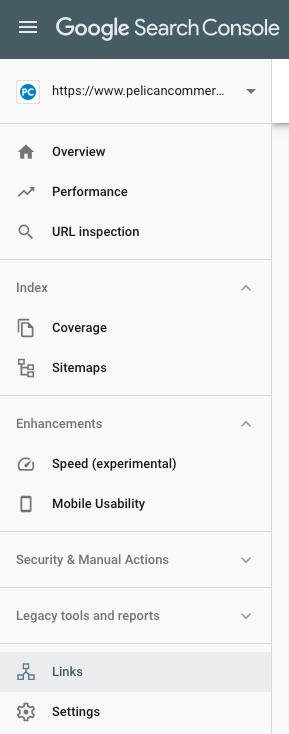
- You’ll now see a few different blocks with data. Look for “Internal Links” and click the “More” link in the lower right-hand corner.

- On the Internal Links page, you’ll see in the upper right-hand corner a download arrow. Click the arrow and then select “Download CSV”.
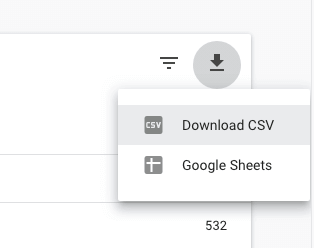
- You’ll now have the .CSV file download of all URLs Google has indexed for your domain name.

If you're using this information to quality control, check your migration to Shopify, then check out our How To Quality Control Check 301-Redirects After Migrating To Shopify blog post for more detailed steps on 301-Redirects and retaining your existing SEO authority/rank.
Common Questions and Answers
Q: How do I get all indexed pages of a website?
A: To get all indexed pages of a website, use Google Search Console. Go to the “Coverage” report under the “Index” section, where you can view and export a list of all indexed pages.
Q: How do I get Google index for my site?
A: To get your site indexed by Google, ensure that your website is accessible, has a sitemap submitted to Google Search Console, and is optimized for SEO. Regularly update content and build quality backlinks to improve indexing.
Q: Does Google index all pages of a website?
A: Google aims to index as many relevant pages of a website as possible. However, not all pages may be indexed due to issues like duplicate content, low-quality content, or pages blocked by robots.txt.
Q: How can I ensure all important pages are indexed?
A: Submit a sitemap to Google Search Console, use internal linking to improve page discoverability, and ensure that pages are not blocked by robots.txt. Regularly check the “Coverage” report in Google Search Console for indexing issues.
Q: Can I see which pages are not indexed by Google?
A: Yes, in Google Search Console, the “Coverage” report will show which pages are indexed and which are not. It provides reasons for non-indexing, such as crawl errors or directives in robots.txt.
Additional Tips
• Regular Monitoring: Regularly monitor your site’s indexing status in Google Search Console to address any issues promptly.
• Quality Content: Ensure all content is high-quality, unique, and valuable to increase the chances of being indexed by Google.
• SEO Best Practices: Follow SEO best practices, including optimizing meta tags, using structured data, and building backlinks.